Blog

This guide is for voice actors who deliver finished, polished audio rather than raw takes, and who’ve started seeing lines like “deliver at -16 LUFS” or “must be broadcast compliant” in their briefs. Maybe you’ve sent a file that sounded perfect at home and then heard it played back noticeably quieter, or squashed, next to everything else. Loudness targets are why. Here’s what LUFS means, the numbers each kind of job expects, and how to hit them without wrecking your read.
Peak meters tell you the wrong thing
The meter most of us grew up watching is a peak meter. It shows the single loudest moment in the signal, and it’s brilliant for one job: making sure you never clip while you record. If that’s the part you’re working on, our guide to gain and recording levels is the place to start.
The trouble is that peaks have very little to do with how loud something sounds. A file with one sharp plosive and a quiet read can peak higher than a dense, punchy read that sounds twice as loud. Ears respond to the overall energy over time, not to the tallest spike.
That’s what LUFS measures. As WBUR’s audio team explained in a guide for public radio producers, “LUFS measure a piece of audio’s perceived loudness by analyzing its levels over time, making it a more reliable method of leveling audio for listener consumption than a peak meter.” The letters stand for Loudness Units relative to Full Scale. You’ll also see LKFS, which is the same measurement under a different name. The European Broadcasting Union’s loudness standard says so in a footnote: “‘LUFS’ is equivalent to ‘LKFS’.”
Am I about to clip?
Shows the single loudest instant. Use it while you record, so nothing hits the top.
How loud does this sound?
Averages the whole file the way ears hear it. Use it when you deliver, so you hit the client’s target.
Two more terms and you’re set. Integrated loudness is the figure for the whole file, start to finish, and it’s what every target below refers to. True peak is a smarter peak reading that catches the overs that can appear when a file is converted or turned into an MP3, which is why specs give a true peak ceiling in dBTP rather than a plain peak.
Broadcast: -23 and a ceiling you don’t cross
Television and radio were the first to sort this out, mostly because viewers got fed up with adverts that blasted out louder than the programme. In Europe and a lot of the world beyond it, the rulebook is EBU R 128.
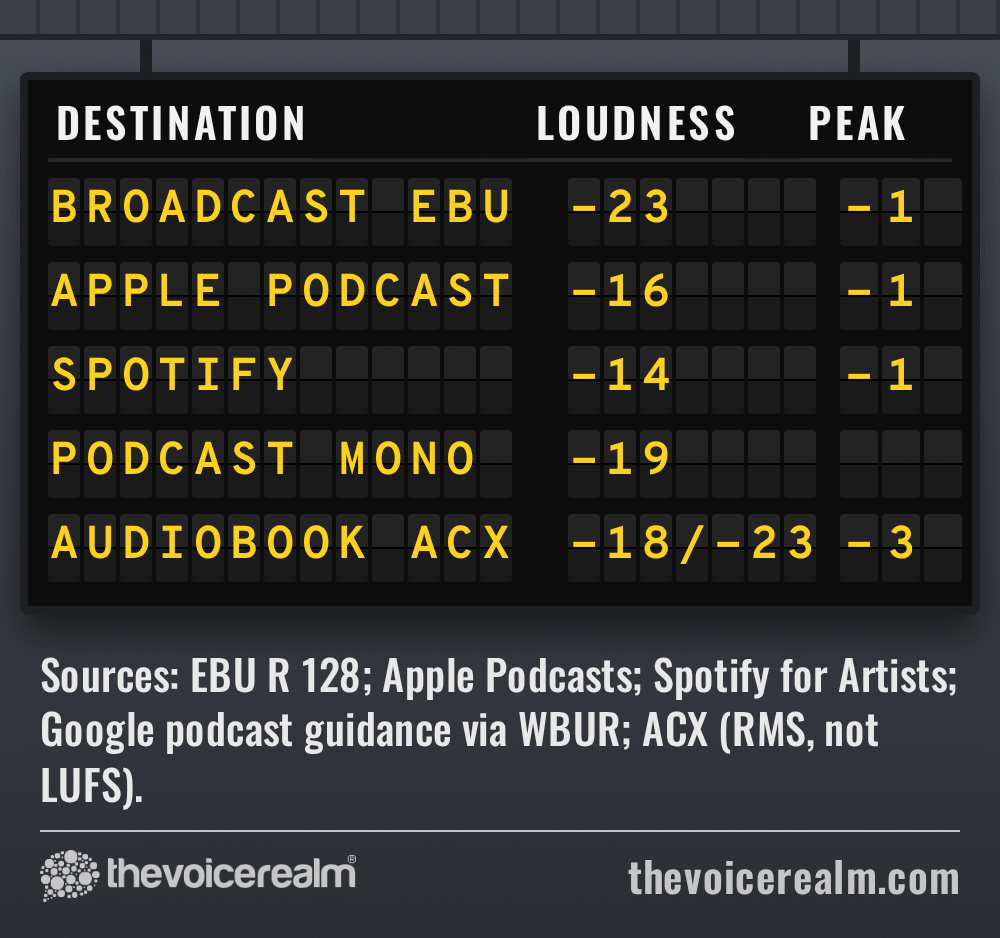
Its central line is clear: “the Programme Loudness Level shall be normalised to a Target Level of −23.0 LUFS.” On peaks, it says “the True Peak Level of a programme shall not exceed −1 dBTP (dB True Peak) during production.” And it asks for the measurement to cover everything: “the audio signal shall generally be measured in its entirety, without emphasis on specific foreground elements such as speech, music or sound effects.”
That last part matters for a voice actor. If you’re voicing a TV spot, you’re usually delivering your voice alone, and the studio adds music and effects and sets the final level of the whole mix. In that case they’ll often want your file clean and unprocessed, not pushed to any target at all. But if you’re delivering a finished spot yourself, voice and music together, it’s the whole thing that has to measure -23.
North American television has its own recommended practice, ATSC A/85, with its own target. Whatever the country, ask the client for their spec sheet rather than guessing. Broadcasters reject files that miss it, and fixing a rejected file under deadline is nobody’s idea of fun.
Broadcast loudness is measured across the whole programme, voice, music and all. © The Voice Realm
Podcasts and the magic number -16
Podcasts get played on phones, in cars and on trains, so they’re mixed louder than broadcast television. The figure you’ll see quoted again and again is -16, and it comes from Apple.
Apple’s audio requirements for podcasters recommend that “the overall loudness remains around -16 dB LKFS, with a +/- 1 dB tolerance, and that the true-peak value doesn’t exceed -1 dB FS.” So if you’re voicing a podcast ad, a show intro or a whole episode, -16 integrated with true peaks no higher than -1 is a safe place to land.

Podcasts are mixed louder because they're heard on phones, trains and in cars. © The Voice Realm
There’s one wrinkle that matters for voice work in particular. A single voice is usually recorded and delivered in mono, and loudness meters measure mono and stereo a little differently. The WBUR guide quotes Google’s podcast guidance asking for “an average loudness of -16 LUFS (Loudness Units Full Scale) for stereo, or -19 LUFS if the content is mono.” If the client’s spec mentions both, follow the mono number for a mono file.
Streaming turns you down, so squashing buys you nothing
Here’s the part that changes how you master. Most streaming services don’t play your file at whatever level you hand them. They measure it and move it.
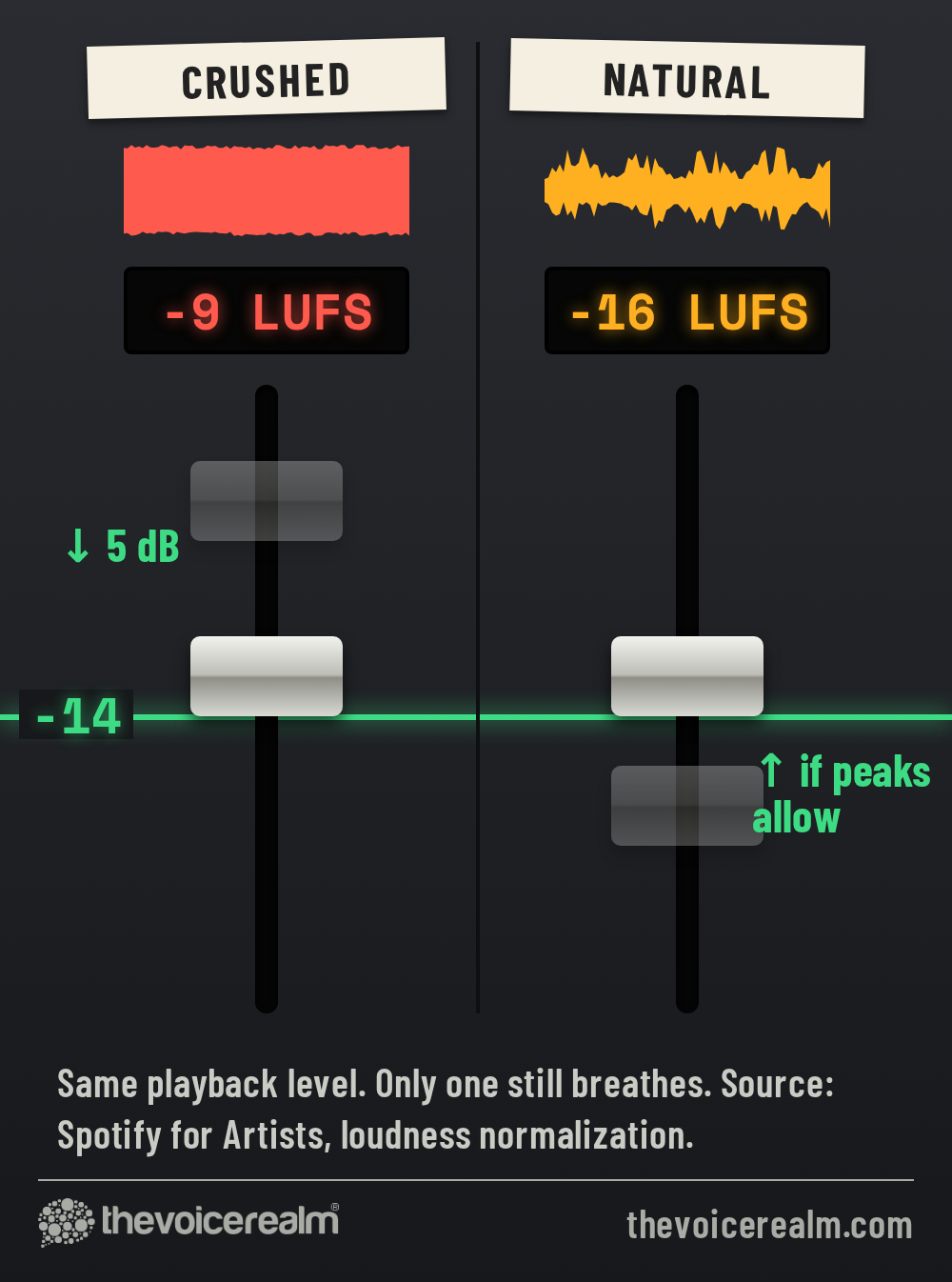
Spotify’s help page for artists is blunt about it: “We adjust tracks to -14 dB LUFS, according to the ITU 1770 standard.” And: “Loudness normalization is applied during playback.” For anything mastered hot, “Negative gain is applied to louder masters so the loudness level is -14 dB LUFS.”
Think about what that means. If you crush your read with heavy compression and limiting to make it sound big and loud, the service just turns it down to match everyone else. All you’ve kept is the damage: no light and shade, breaths that jump out, a tired, flat sound. Apple warns about exactly this, saying that “content that is heavily compressed and amplified might be too loud, will lack the dynamic range, and can introduce distortion.”
 VOICEMASTERACADEMYLearn the craft in order.Module one is freeStart module oneTwenty modules, start to finish.
A natural, well-controlled read at a sensible level sounds better after normalisation than a squashed one, every time. Spotify’s own mastering advice is to keep true peak “below -1dB TP (True Peak) max,” and tighter still for loud masters: “If your master is louder than -14dB integrated LUFS, keep True Peak below -2dB to avoid extra distortion.”
© The Voice Realm
Audiobooks still speak in RMS
Audiobooks are the odd one out. Their best-known spec, from ACX, the Audiobook Creation Exchange, is written in RMS rather than LUFS. RMS is an older average-level measurement. It’s close to loudness but not the same thing, so you need a meter that reads it.
ACX’s own production guide, written by its in-house “Alex the Audio Scientist,” sums it up: “if your RMS is between -18dB and -23dB RMS, with peaks at -3dB, you’ll achieve the optimal sound across all formats.” The same piece explains why the numbers sit where they do: “Audible will apply light dynamics processing once your audiobooks are submitted, so your production’s overall levels should not be too high or too low.”
It also gives a worked example worth borrowing. A chapter peaking at -4 dB with an RMS of -27 dB is too quiet. A limiter takes 3 dB off the peaks, leaving them at -7, and then the whole file goes up by 4 dB, landing peaks at -3 and RMS at -23. That’s the logic of mastering for any target in a nutshell: control the peaks first, then raise the whole thing.

Audiobooks: RMS between -18 and -23 dB, peaks no higher than -3 dB. © The Voice Realm
If you’re new to long-form, our guide to becoming an audiobook narrator covers the rest of the technical bar, from room tone to file format.
When the client doesn’t give you a number
Lots of briefs say nothing about loudness at all. E-learning modules, explainer videos, phone systems, corporate narration, a local business’s website. What then?
First, just ask. “Where will this play, and do you have a loudness spec?” is a perfectly professional question, and it often turns up a technical document the client forgot to send. The producer will be glad you asked.
If there’s still no answer, think about where the file is going. Something headed for an online video platform or a podcast feed is usually fine around -16 integrated with true peaks under -1. Something going to a video editor who’ll mix it with music is usually better delivered with plenty of headroom and light processing, so the editor has room to work. A phone system is a different world again, with narrow sound and its own file formats, so check the system’s spec.
Whatever you send, keep an unprocessed edited version of every job. When a client comes back with “can you make it match our other files,” you’ll be glad you can start again from clean audio rather than undoing a limiter.
© The Voice Realm
Measuring it yourself
You don’t need expensive gear for any of this. Most recording software now has a loudness meter built in, and there are good free ones as plug-ins. Look for one that shows integrated loudness, short-term loudness and true peak. Those three numbers are all you need.
A simple order that works for most voice delivery:
- Edit first. Clean up breaths, clicks and noise before you touch levels.
- Shape the tone with gentle EQ and light compression. Our guide to EQ and compression for voice over shows how much is enough.
- Play the whole file through the meter and note the integrated reading.
- Raise or lower the whole file by the difference between that reading and the target.
- Put a true peak limiter last, set a little under the ceiling the spec allows, so nothing pokes through.
- Measure the finished file once more, all the way through, before you send it.
Then name the file clearly and add a line in your delivery note with the figures, something like “-16 LUFS integrated, -1.5 dBTP.” It takes ten seconds and it tells the client you know what you’re doing before they’ve pressed play.
Sources: European Broadcasting Union, “EBU R 128: Loudness normalisation and permitted maximum level of audio signals” (November 2023); Apple, “Audio requirements”, Apple Podcasts for Creators; Spotify for Artists, “Loudness normalization on Spotify”; ACX, “Mastering Audiobooks with Alex the Audio Scientist”; WBUR, “It’s 2020, Do You Know Where Your LUFS Are?” (David Moore, 2 July 2020).
Ready to get booked?
See the jobs open right nowAbout Sarah Robbins
Sarah Robbins writes for The Voice Realm about finding voice over work, home studios, casting and the business side of voice acting.