Blog
If you record at home, sooner or later somebody will tell you to “just put a gate on it.” Your room hums a bit, the gaps between your sentences aren’t quite clean, and there’s a button that makes the gaps go silent. It feels like magic for about a day. Then a client writes back and says your audio sounds chopped, and you can’t hear what they mean, because you’ve stopped listening to the gaps.
This one’s for voice actors who edit their own work. We’ll go through what a noise gate does, why it so often makes a decent recording sound worse, and how to set one gently on the days you do need it.
A door with a doorman who only knows loud
A gate watches one thing: level. You choose a threshold. Audio louder than that goes through untouched. Anything quieter gets turned down, or shut out altogether. The Audacity manual calls the two states “open” and “closed”, which is all you really need to picture.
The trouble is what else is quiet. The end of the word “breath” is quiet. So is an F, an H, the little intake before a hard line, the last syllable of a sentence that trails off because you meant it to. The doorman can’t tell a refrigerator from a feeling. He only knows loud.
That’s why a gate tuned to kill the noise so often takes a nibble out of the acting. Listeners rarely say “that’s gated.” They say it feels cold, or jumpy, or a bit like a robot.
Why the noise seems louder once it’s gated
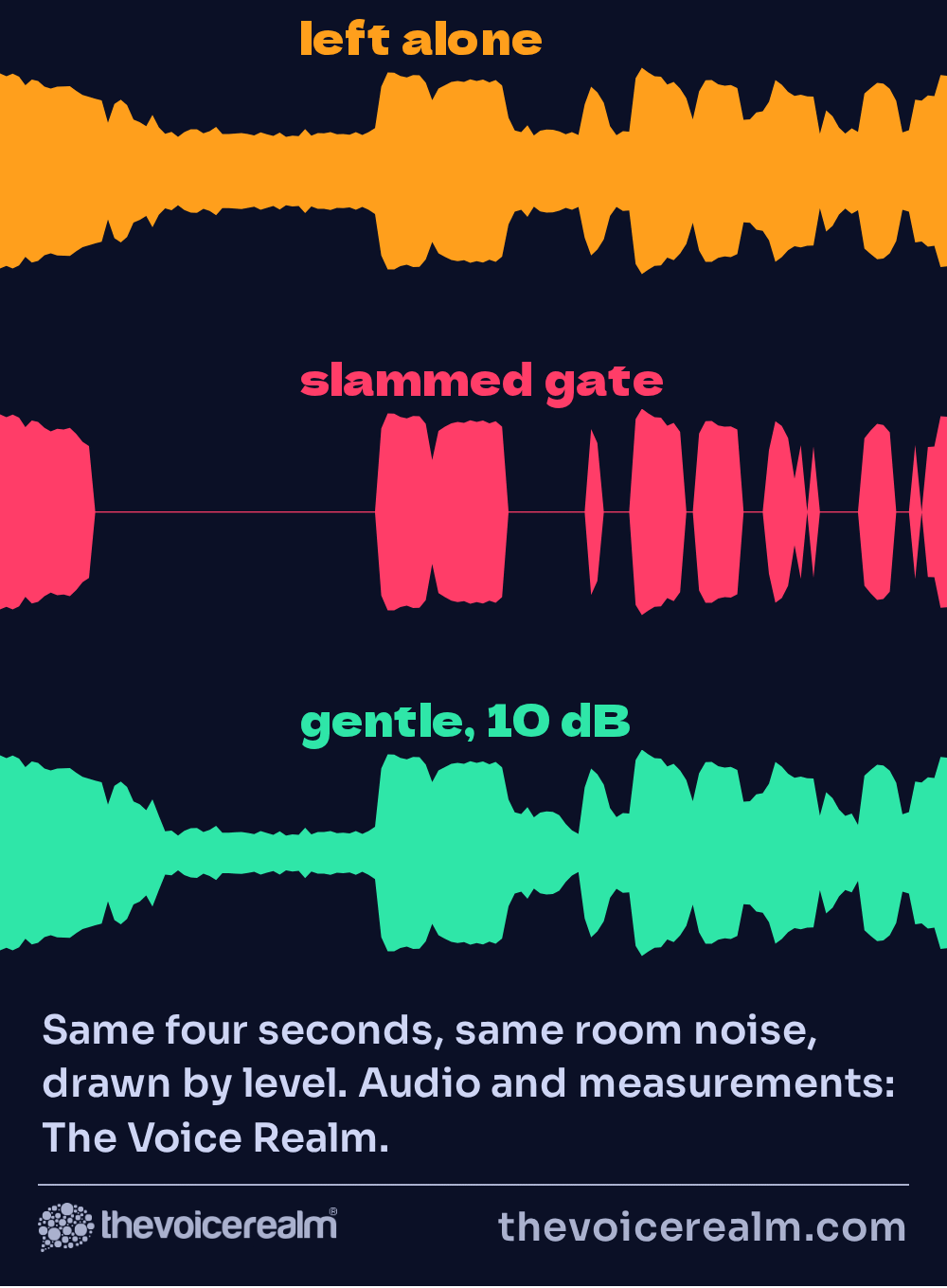
Here’s the part that surprises people. A gate does nothing at all about the noise while you’re talking. The door’s open, so the hum walks in with you. You’ve only removed it from the gaps.
If the hum is steady and fairly low, your voice mostly hides it. But now it switches on with each phrase and off after it. Sound On Sound describes the effect in its guide to gates and expanders: “the noise levels now vary, which can draw the listener’s attention to the noise, making the whole process counter-productive.”
Ears adapt to a steady sound and stop noticing it. They’re very good at noticing change. So a constant faint hiss that nobody minded becomes a hiss that breathes in and out, and everybody minds. If you’ve ever heard a voice memo where the background seems to puff up around each word, you’ve heard it.
It gets worse after mastering. Compression lifts the quiet parts, so a gap that sounded merely tidy on your timeline can turn into a trapdoor.
© The Voice Realm
What each knob does to a sentence
Plug-ins dress these up in different ways, but nearly all of them have the same handful of controls.
- Threshold. The level where the door opens. Too high and word endings vanish. Too low and the noise holds the door open by itself.
- Range, floor or level reduction. How far down things go when the door’s closed. This is the one that decides whether you sound human. Audacity’s manual says: “For the most ‘transparent’ results avoid setting the Level reduction any lower than absolutely necessary.”
- Attack. How fast it opens. Too slow shaves the front off a T or a K. Zero can click.
- Hold. How long it stays open after you drop below the line. It stops the door flapping in the middle of a phrase.
- Release, or decay. How slowly it closes. Short releases chop word tails. Longer ones let a sentence finish.
Some gates, Audacity’s included, can look ahead and start opening before your word arrives. If yours has a lookahead setting, use a few milliseconds of it.
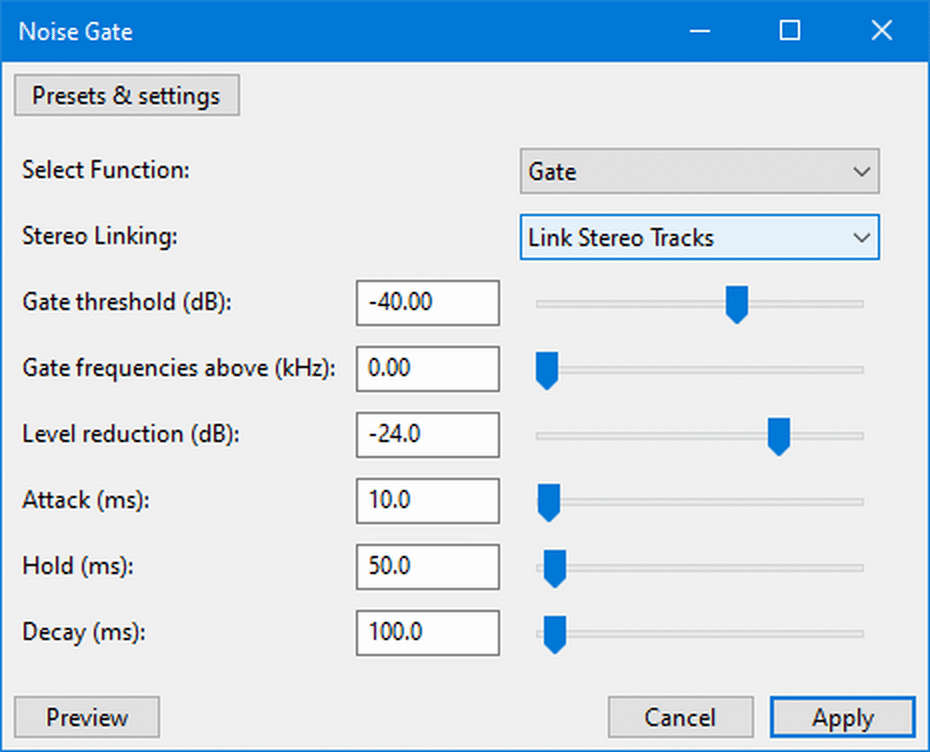
Audacity's Noise Gate window, as shown in its manual, 25 November 2026. Image: Audacity Manual
Try its gentler cousin first
An expander works the same way with better manners. A gate drops everything under the line by a big fixed amount. An expander turns it down in proportion, so something just under the threshold barely moves. Waves, which makes both, puts gates at ratios of “typically 100:1 or higher” and expanders at “often around 2:1 or 4:1.”
Gate
Open or shut. Good for a cough between takes, a chair creak in a long pause, or a drum kit. Risky on speech that gets quiet on purpose.
Expander
Eases the gaps down and leaves a little air behind. The safer choice for narration, commercials and nearly everything we record.
For spoken word, start with an expander at 2:1 and a range of 6 to 10 dB. That’s only a starting point, but it’s a kind one. You’re trying to lower the room a step, so that nobody can point at where it happened.
Set it with your quietest line
Most bad gates were set using the loudest, easiest sentence in the script. Do it the other way round.
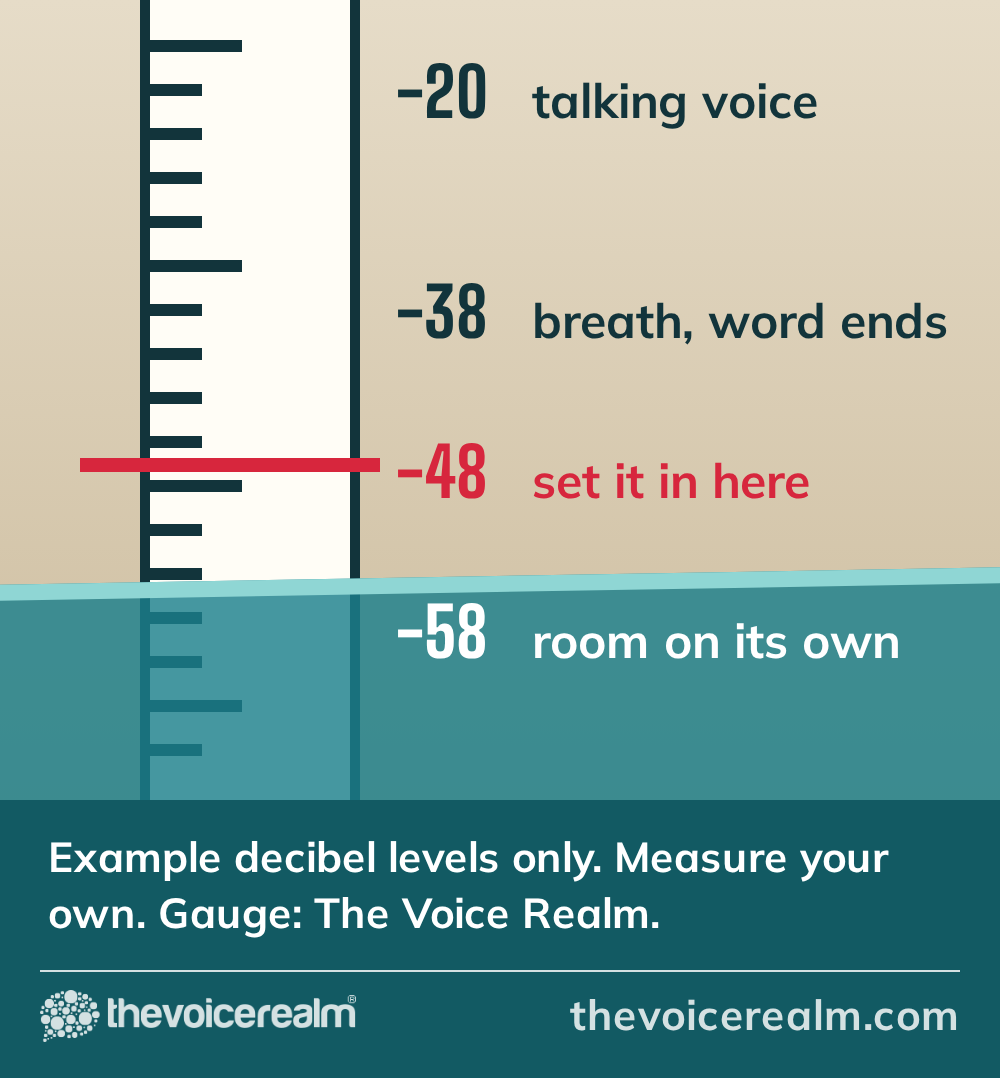
Record ten seconds of nothing, then a few normal lines, then the softest, most intimate line you’ve got, the one that fades out at the end. Loop that last one. Measure the room on its own, and look at the level of your gentlest word ending. Your threshold belongs between those two numbers.
 VOICEMASTERACADEMYTwenty modules, one at a time.Breath controlHome studioCommercial techniqueAuditionsStart module oneNo experience needed.
Now check there’s space. If the room sits at -58 dB and your quietest consonants are up around -38, you’ve got room to work. If they’re only a few decibels apart, no setting will save you. The gate can’t separate two things that are the same size. That’s the recording telling you to fix the room.
© The Voice Realm
Then set the timing. Try an attack of about 5 to 10 milliseconds, a hold of 100 or so, and a release of 200 to 300. Close your eyes and listen only to the ends of words. If one sounds bitten off, lengthen the release before you touch anything else.
Last, turn the headphones up and play the gaps. You want to hear the room step back, not leave. Then switch the whole thing off and on a few times. If off sounds better, believe your ears.
Leave it off when you audition or record
Two rules save a lot of grief. The first is never print a gate on the way in. If your interface, your streaming app or your mic’s software has one switched on, find it and turn it off. Once a gate has eaten a syllable during recording, it’s gone. After recording you can always undo.
The second is to be careful with auditions. People listening to fifty reads in a row are comparing sound as well as acting. A bit of natural room tells them roughly what they’re buying. Dead black gaps make them wonder what’s being hidden. Check video call settings too before a live session. Many calling apps do their own noise removal, and it behaves a lot like an impatient gate.
© The Voice Realm
If a client says “raw audio, no processing,” that includes this. And if they’ll be cutting your read against music or other voices, they’d rather do the cleaning themselves. They’ve got the rest of the picture and you don’t.
Fill the gaps with your own room
Long-form work wants continuous air. A listener with earbuds in, three hours into a book, will feel it every time the world switches off. So when you take out a noisy breath or a page turn, don’t leave a hole. Paste in a piece of clean room from the same session. We’ve explained how to record and use room tone in its own piece.
Many narrators do this by hand, with the gain lowered on the noisiest breaths and the rest left alone. It’s slower than a plug-in. It also never eats a consonant. On a thirty-second spot, it takes about two minutes, and you can fold it into the order you edit in anyway.
Where does the gate go if you use one? Early, before compression. Compress first and you’ve squeezed the quiet and loud parts together, which makes the threshold far harder to place. There’s more on that chain in our guide to EQ and compression.
The noise you can unplug
The best gate is the one you don’t need. Before reaching for any plug-in, walk round the house with your headphones on and the mic open. The fridge is the usual suspect. So is the air conditioner, a computer fan, a dimmer switch, a laptop charger. Turn each off for ten seconds and watch the meter. Often a single culprit is worth more than every setting above. Our walk-through on hunting down background noise takes you room by room.
© The Voice Realm
Then get closer to the mic, within reason. Halving the distance makes your voice louder while the room stays put, and that does more than 10 dB of cleverness afterwards. Soft things around you help with the echo, which a gate can’t touch while you’re speaking.
If you’re not sure where you stand, Voice Edit Suite’s free Home Studio Analysis will listen to a sample of your room and give you something concrete to work on. Measure, change one thing, measure again.
A thirty-second test before you send
Play your finished file twice. The first time, on headphones, louder than usual, listen only to the spaces between words. Do they puff, click or go black? The second time, on a phone speaker at normal volume, follow the performance. Does anything feel clipped, or colder than you remember reading it?
If both pass, send it. If either one fails, back the range off by 3 dB and try again. A voice in a real, quiet room has never put a client off. A voice that keeps falling into a hole has.
Sources: “Noise Gate”, Audacity Manual (settings window pictured); “Production Techniques Using Gates & Expanders”, Sound On Sound; “Audio Gating Basics”, Waves.
Ready to get booked?
See the jobs open right nowAbout Sarah Robbins
Sarah Robbins writes for The Voice Realm about finding voice over work, home studios, casting and the business side of voice acting.