Blog
Blog
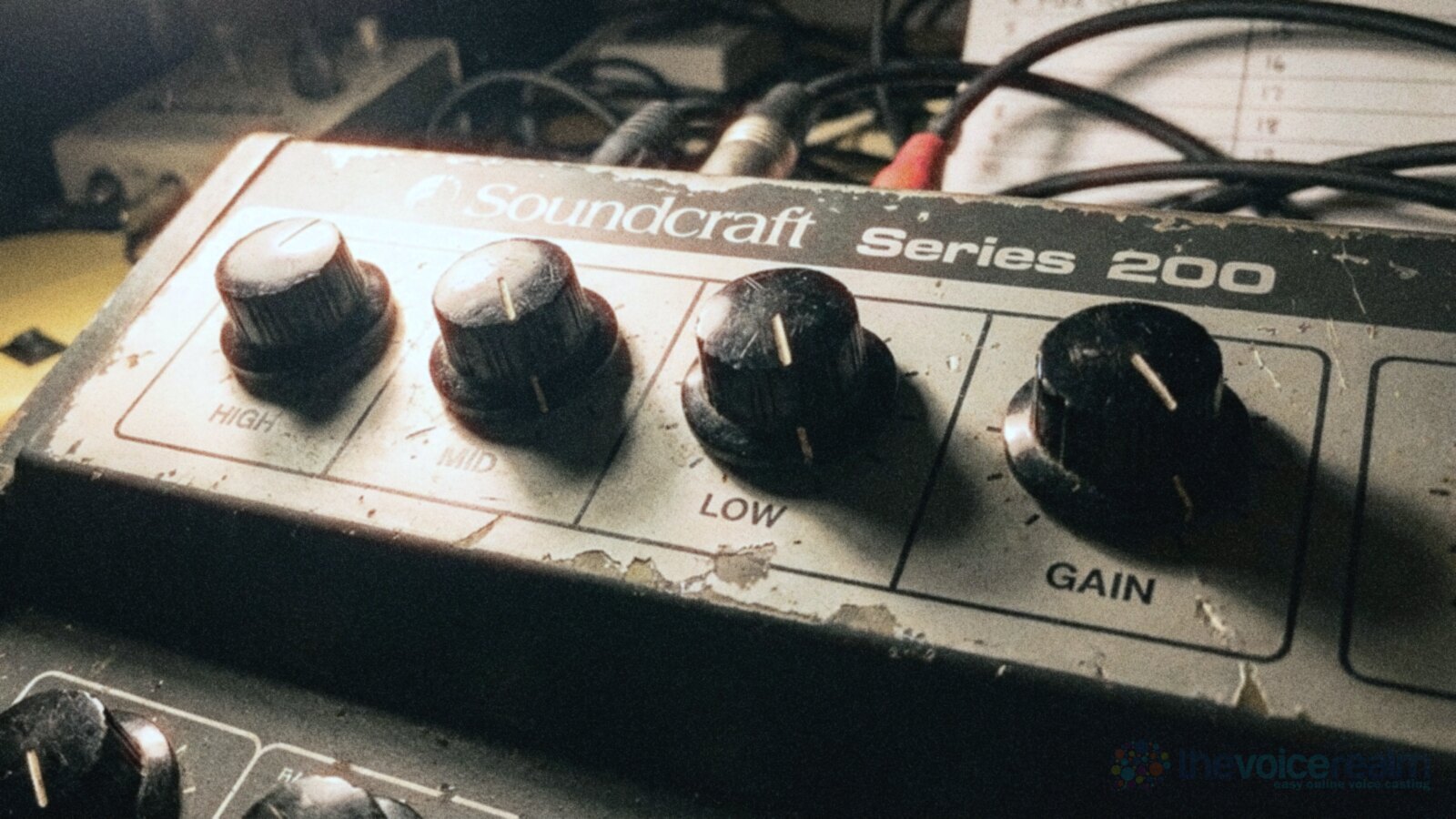
This one’s for voice actors with a home studio who’ve opened the EQ and compressor in their editing software, moved a few knobs, and weren’t sure if they’d made things better or worse. You don’t need to be an engineer to get this right. You need to know what each tool does, where to start, and when to stop.
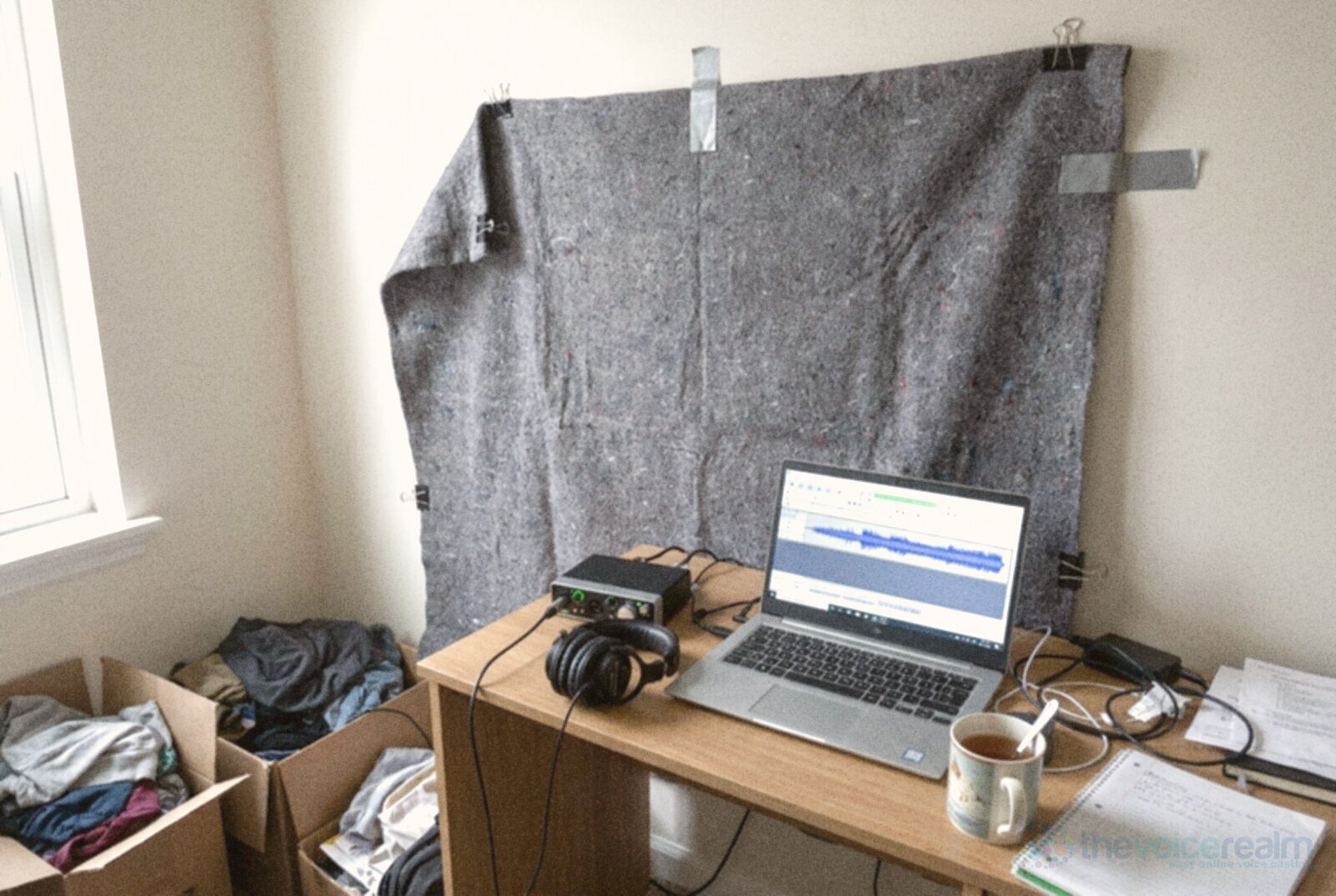
Here’s the short version before the detail: fix the room and the mic position first, keep a raw copy of everything, cut before you boost, squeeze gently, and check the result on the speakers your listeners actually use. Processing is seasoning. It can’t turn a boomy closet into a booth.
First, ask whether anyone wants it processed at all
A lot of clients don’t want your EQ or compression. Studios, post houses and many directed sessions ask for a clean, unprocessed file so their own engineer can mix your voice with music and picture. If you send them something heavily squeezed, they can’t undo it. So the first rule is boring and important: read the brief, and if it asks for raw audio, send raw audio.
Other jobs expect a finished file. E-learning modules, explainer videos for small businesses, phone prompts and audiobooks often go straight from your laptop to the listener. Audiobooks have the clearest published rules. ACX, the audiobook production platform, asks that a file’s “Volume is between -23dB and -18dB RMS,” that “Peak levels are less than -3dB,” and that the “Noise floor is less than -60dB RMS.” It also wants the whole book to sound consistent from chapter to chapter. Gentle EQ and compression are how most narrators get there.
Either way, save the untouched recording before you process anything. If you’ve got a habit of exporting over the original, break it today. Our guide to the sample rates, bit depths and formats clients ask for covers the file side of this.
© The Voice Realm
What EQ actually does to a voice
An equaliser turns some frequencies up or down. That’s it. A voice isn’t one pitch, it’s a stack of them, and each part of the stack is responsible for something you can hear.
Craig Anderton, writing in Sound on Sound about vocals, splits a male voice into “the lows, below about 150-200 Hz; the lower mid-range, around 300-400 Hz; the upper mid-range, in the 2-4 kHz range; and the highs.” He adds that for female voices the important tones sit “somewhat higher.” He’s writing about singers in a music mix, but the map works for speech too.
In plain terms: the very bottom is rumble and room thump, plus the warmth a close mic adds. The low mids are body, and too much of it sounds boxy or muddy. The upper mids are where consonants and clarity live. The top is breath, air and, unfortunately, sizzle on your S sounds.
The trick is that you’re not trying to make a voice “better” in the abstract. You’re trying to remove what the room and the mic added that your real voice doesn’t have, then add a touch of clarity if the read needs it.
Cut before you boost
Most good voice EQ is subtraction. Boosting is louder and more fun, which is exactly why it’s dangerous. Turn three bands up by a few decibels and you’ve mostly made the file louder and the noise louder with it.
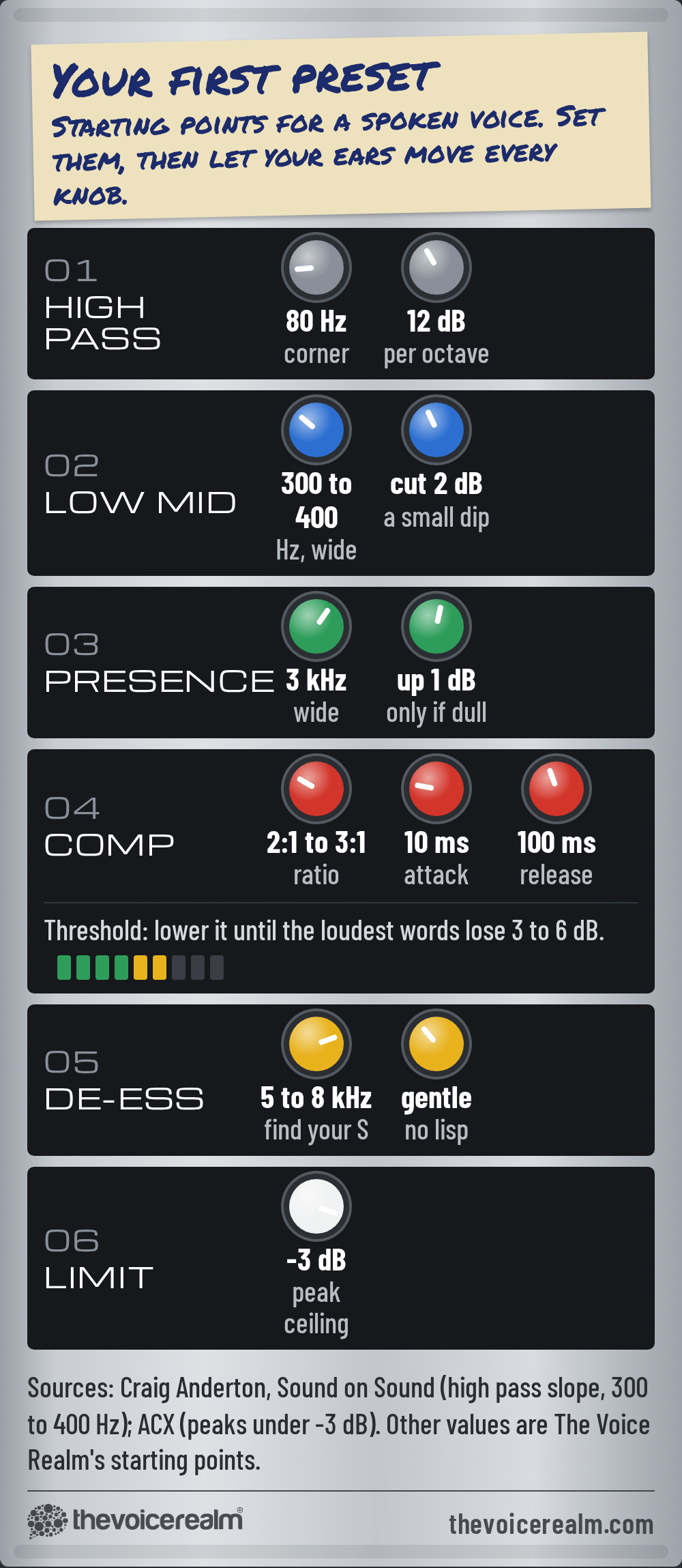
Start at the bottom. Get close to a directional mic and the bass climbs, which is called the proximity effect. A high pass filter (it lets everything above a set point pass and rolls away what’s below) cleans that up, along with traffic rumble and desk bumps. Anderton’s advice is that “A high-pass filter usually works well here, with a moderate slope (eg. 12dB per octave).” He also warns that some performers lean on that extra bass on purpose, so “don’t automatically EQ to reduce the low end.” Roll it off until the voice stops sounding thick, then back off a little.
Next, the low mids. Anderton calls out “excess energy around 300-400 Hz” as a common problem, and says “A slight, somewhat broad, cut in this area can often tighten up the vocal sound.” Untreated rooms pile up in exactly that zone, which is why so many home recordings sound like they were made in a cupboard.
To find a problem frequency yourself, use the sweep trick. Make a narrow band, boost it a lot, and slide it slowly across the low mids while the voice plays. When one spot suddenly sounds honky or hollow, that’s your culprit. Now turn the boost into a small, wider cut. Never leave the big boost in.
Only then think about adding anything. If the read sounds a little dull after the cuts, a small lift in the upper mids helps words cut through. If it already sounds clear, leave it alone. Plosives that still thump after the high pass are a mic technique problem first, and our guide to stopping popping Ps and thumping Bs will save you more than any filter.
Compression in plain words
A compressor is an automatic hand on the volume. When your voice gets louder than a level you choose, it turns it down a bit. Then you turn the whole file back up. The quiet words end up closer to the loud ones, so a listener on a noisy train doesn’t miss half a sentence.
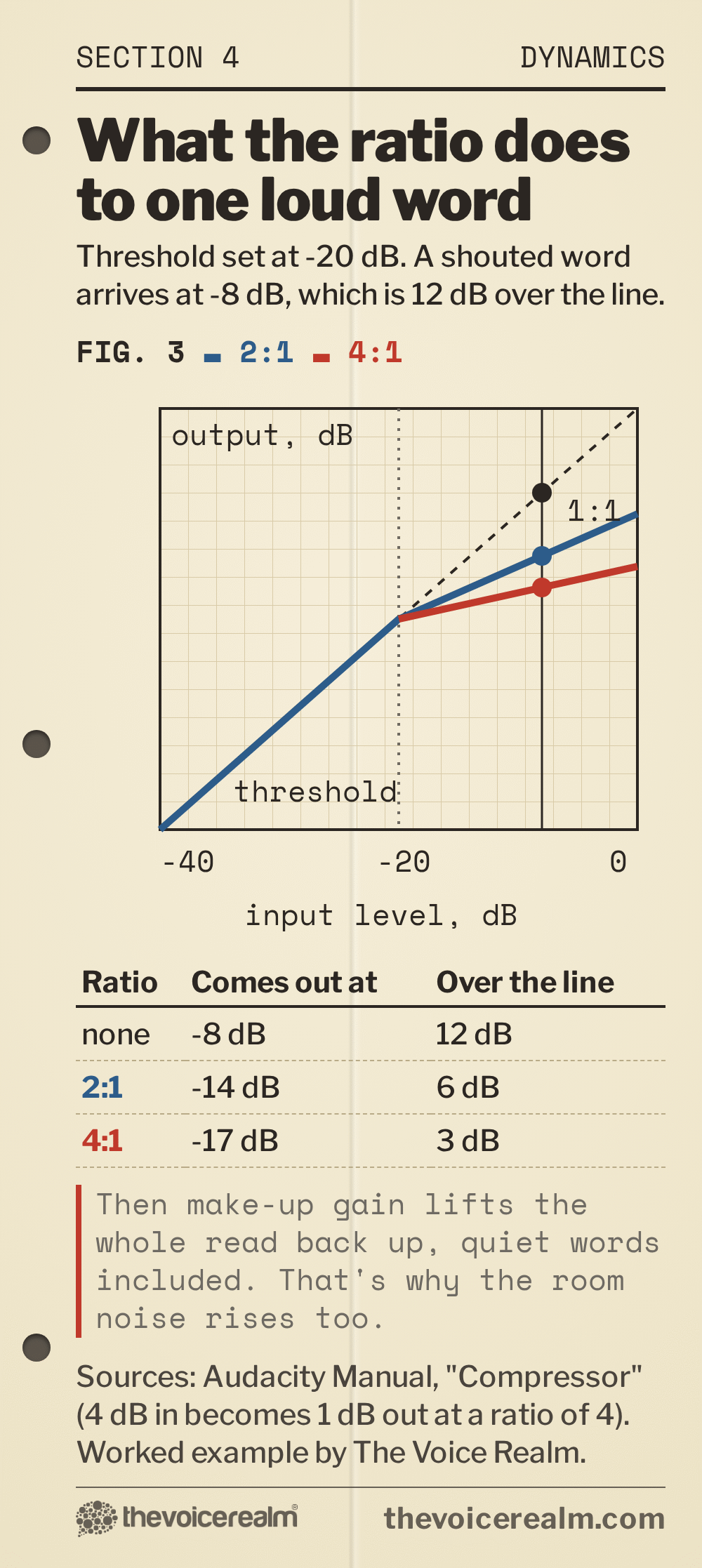
The free Audacity manual explains each control as clearly as anyone. The threshold is “the input level above which compression starts.” The ratio is “how hard the signal above the threshold is pulled down,” and the manual’s own example is the one to remember: “A ratio of 4 means 4 dB in becomes 1 dB out.” Attack is “how quickly compression takes hold once the signal crosses the threshold,” and release is “how quickly it lets go again.” Make-up gain is the turn back up at the end.
Put it together and, in the manual’s words, “The result is a narrower gap between the loudest and quietest parts, which is what makes a voice track sit steadily in a mix.”
 VOICEMASTERACADEMYTwenty modules, one at a time.Breath controlHome studioCommercial techniqueAuditionsStart module oneNo experience needed.
For speech, gentle wins. A low ratio, a threshold that only catches your louder words, an attack that lets the start of each word through so consonants stay crisp, and a release that lets go before the next phrase. Watch the gain reduction meter as you play the file. If it’s moving on every syllable, or never coming back to zero, the threshold’s too low.
© The Voice Realm
The order of the chain matters
Plugins run in order, top to bottom, and each one hears what the last one did. A sensible order for spoken voice looks like this. Clean up first: remove clicks and breaths you don’t want, and use noise reduction lightly if you must. Then EQ, so the compressor isn’t reacting to rumble and mud you were going to remove anyway. Then compression. Then a de-esser, because compression and any top end boost tend to make S sounds hotter. Last, a peak limiter that stops anything going over your ceiling.
“If I can hear the compressor ‘working’, I’m not happy.”
Craig Anderton, Sound on SoundPost this quote
Some engineers put a gentle EQ after the compressor too, for a last bit of polish. That’s fine. What isn’t fine is stacking three compressors because each one seemed to help on its own. If S sounds are the thing bothering you, we’ve got a whole piece on taming sibilance without making you lisp.
© The Voice Realm
Where processing goes wrong
Over-compression is the classic. The voice sounds flat and tired, breaths between lines become loud gasps, and the room noise swells up in every pause. That last one matters: a compressor plus make-up gain lifts everything quiet, including the fan, the fridge and the neighbour’s TV. A file that measured fine for noise before compression can fail after it. If you’re fighting a noise floor, sort the noise at the source with our guide to hunting down the hum under your voice.
Heavy noise reduction is the second trap. Push it too far and voices take on a watery, underwater sound that listeners notice even if they can’t name it. Use a little, or none.
Third is EQ that chases a sound you heard on someone else’s demo. Your voice, your mic and your room aren’t theirs. Copying their settings is like borrowing their glasses.
And the sneaky one: judging your changes at different volumes. Louder always sounds better for a second. When you compare the processed version with the raw one, match their levels first, then decide.

© The Voice Realm
Check it where people will actually hear it
Your headphones are a microscope. They’re great for finding clicks and terrible at telling you how a voice will feel coming out of a laptop. Before you send anything, play a minute of it on at least three different systems: your headphones, a pair of speakers in a normal room, and cheap earbuds or a phone speaker.
Listen for different things on each. On speakers, does the voice sound like a person in the room or a person in a box? On earbuds, are the quiet words still clear, and do the S sounds sting? On a phone speaker, does the low end vanish and leave the voice thin? A small change that helps on all three is the one to keep.

© The Voice Realm
Measure, then turn it into a preset
Once your chain sounds right, save it as a preset with a name that says where it came from: your mic, your room, your usual distance. That’s your starting point for every job, not your finishing point. A different script, a different read or a cold on a Tuesday will all need small tweaks.
Measure your room before you settle on anything. The free Home Studio Analysis from Voice Edit Suite checks your recording for noise and echo, so you can see whether a problem belongs to the room or the processing. Measure, change one thing, measure again. If you’re new to cleaning up files, our walk-through on the editing pass order that saves hours is the natural next read.
Then step away from the knobs. The best processing on a voice over is the kind nobody notices, and the best way to need less of it is a good room, a steady distance from the mic and a read that’s already alive.
Sources: ACX, “ACX Audio Submission Requirements”; Craig Anderton, “How To Make Your Vocals Twice As Good! Part 2”, Sound on Sound; Audacity Manual, “Compressor”.
Ready to get booked?
See the jobs open right nowAbout Sarah Robbins
Sarah Robbins writes for The Voice Realm about finding voice over work, home studios, casting and the business side of voice acting.